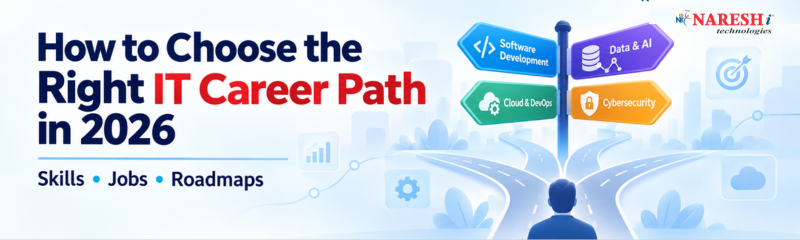
Choosing an IT career can be confusing when almost every week there seems to be a new role, tool, or technology to learn. A student may start with Python, then hear that cloud computing is the better option. Someone already working as a developer may wonder whether to move into DevOps, data, AI, or cybersecurity.
The problem is not a lack of career options. It is choosing one without understanding what the work actually involves. The right path depends on your current skills, the kind of problems you enjoy solving, and the type of work you want to do every day.
This guide breaks down some of the major IT career paths in 2026, the skills they require, and a practical way to decide where to focus.
A common mistake is choosing a career because a technology is popular.
For example, someone may decide to learn cloud computing simply because they see many cloud-related job titles. But cloud work can involve infrastructure, networking, deployment, monitoring, security, automation, and troubleshooting. If you dislike working with systems and debugging deployment problems, the popularity of cloud jobs does not make it a good personal fit.
A better question is:
"What kind of problems do I want to solve?"
If you enjoy building applications, software development may suit you. If you like working with numbers and finding patterns, data-related roles may be more interesting. If you enjoy servers, deployments, automation, and troubleshooting, DevOps or cloud engineering could be a better direction.
This approach also prevents a common learning problem: spending a few weeks on one technology, switching to another, and eventually knowing a little about many tools without being confident in any of them.
There is no single "best" IT career. Different paths require different strengths.
Career path | Typical work | Important skills to build
Software Development | Build and maintain applications and APIs | Programming, databases, Git, APIs, testing
Data Analytics | Turn business data into useful insights | SQL, Excel, Power BI, Python, data interpretation
Data Science | Build analytical and machine learning solutions | Python, statistics, SQL, machine learning
DevOps | Automate development and deployment processes | Linux, Git, CI/CD, containers, cloud
Cloud Computing | Design, deploy, and manage cloud infrastructure | Networking, Linux, cloud platforms, security
Full Stack Development | Work on both frontend and backend systems | HTML, CSS, JavaScript, frontend and backend frameworks
AI / Machine Learning | Develop systems that use data and models to make predictions or generate results | Python, statistics, ML concepts, APIs, model evaluation
These roles can overlap. A software developer may work with cloud services. A data scientist may use machine learning. A DevOps engineer may write Python or shell scripts. That is why learning fundamentals first is useful even when you have a specific career target.
Software developers spend much of their time turning requirements into working applications. The work is not simply writing code. Developers also read existing code, investigate bugs, work with databases, review changes, test features, and communicate with other team members.
A beginner can start with one programming language such as Python, Java, or C# rather than trying to learn several languages at once.
Data analytics is a practical option for people who enjoy understanding what data is saying.
A data analyst might use SQL to retrieve information from a database, Excel to inspect or clean data, and Power BI to create reports and dashboards.
Data science goes further into statistical analysis, machine learning, experimentation, and predictive modelling. Python becomes particularly useful here.
The important distinction is that knowing a tool is not enough. A person who can create a Power BI dashboard but cannot explain what the numbers mean will struggle with real analytical work.
DevOps sits between software development and IT operations. The focus is often on making software delivery more reliable and repeatable.
A learner may encounter Git, Linux, CI/CD pipelines, Docker, Kubernetes, monitoring tools, and cloud platforms.
Cloud computing has a broader scope. Depending on the role, the work can include virtual machines, storage, networking, databases, identity management, security, and infrastructure automation.
You do not need to learn every cloud service. Understanding the underlying concepts is more valuable than memorising dozens of service names.
Technology-specific knowledge changes over time, but several skills remain useful across IT jobs.
Programming fundamentals help you understand logic, data structures, functions, debugging, and how software behaves.
SQL is useful far beyond data analyst roles. Developers, testers, data professionals, and many other technical teams work with databases.
Git is important because professional software work involves tracking changes and collaborating with other people.
Problem-solving is harder to demonstrate through a certificate but extremely important in interviews and actual work. Employers need people who can investigate a problem rather than immediately look for a ready-made answer.
Communication matters too. A developer may need to explain a technical issue to a product manager. A data analyst may need to explain why a dashboard number changed. Technical ability becomes more useful when you can clearly explain your decisions.
AI tools are also becoming part of many technical workflows. Learning how to use them responsibly can improve productivity, but they should not replace your understanding of the code, query, analysis, or architecture you produce.
Your starting point should influence your roadmap.
Start with computer and programming fundamentals. Pick one language and learn it properly.
For example:
Python → programming fundamentals → SQL → Git → projects → role-specific skills
Do not begin by collecting certifications from several unrelated areas.
Focus on becoming useful in one role rather than trying to qualify for every IT job.
For a software development target, you could build skills around programming, databases, APIs, Git, testing, and one development stack.
For analytics, a reasonable direction could be Excel → SQL → Power BI → Python basics → projects.
The goal is to have enough practical knowledge to discuss your work confidently in interviews.
Your next move can be based on the problems you currently encounter.
If deployment and infrastructure interest you, DevOps or cloud may be a natural extension.
If you enjoy working with data, SQL, analytics, data engineering, or machine learning may be worth exploring.
If you are comfortable with application development but want to work with AI-powered features, learning how APIs, model services, data pipelines, and evaluation work can be more useful than simply collecting AI-related course certificates.
A good roadmap should move from knowledge to application.
Learn the concepts that your chosen role depends on.
For development, this could include programming logic, object-oriented programming, databases, and HTTP.
For data, it could include SQL, data cleaning, basic statistics, and data visualisation.
Once the fundamentals are comfortable, learn the tools used to perform the work.
For example, a data learner might work with SQL, Excel, Power BI, and Python.
A DevOps learner might move into Linux, Git, Docker, CI/CD, and a cloud platform.
Build projects that require decisions rather than simply following tutorials.
A data analytics project could involve cleaning a messy sales dataset, writing SQL queries, identifying useful metrics, and building a dashboard.
A development project could involve user authentication, database operations, an API, validation, error handling, and deployment.
Review your projects and be ready to explain:
Why did you choose this approach?
What problem were you solving?
What went wrong?
How did you debug it?
What would you improve?
Those questions reveal much more about practical knowledge than simply listing technologies on a resume.
Consider a graduate who knows basic Python and is trying to decide between software development and data science.
Instead of immediately enrolling in a large course covering dozens of technologies, the learner could spend two weeks testing both types of work.
For development, build a small application with a database and a few APIs.
For data, take a public dataset, clean it with Python, query it with SQL, and create a simple dashboard.
Then compare the experience.
Did you enjoy debugging the application and thinking about how different components connect?
Or did you prefer finding patterns in the data and explaining why certain results appeared?
This small experiment will not determine your entire career, but it can provide better evidence than choosing a field because someone said it has good IT Jobs.
One of the biggest mistakes is learning too many technologies at once. Five unfinished courses do not provide the same value as one completed learning path with practical projects.
Another problem is treating certificates as proof of ability. Certifications can demonstrate structured learning, but they do not automatically show that you can build, troubleshoot, or explain something.
Some learners also spend months watching tutorials without building anything. Tutorials are useful for learning concepts, but projects expose gaps that videos often hide.
There is also a tendency to copy job descriptions word for word. A job posting may mention ten tools, but that does not necessarily mean a beginner needs expert-level knowledge of all ten.
Instead, identify the core requirements that appear repeatedly and build depth there.
If your goal is to apply for IT Jobs for Freshers, think beyond the course syllabus.
Create two or three projects that match the role you want. Keep the source code organised and use Git to track your work where appropriate.
For a developer, that could mean building a web application instead of another basic calculator.
For an aspiring analyst, it could mean creating a dashboard from raw data and documenting the business questions behind the analysis.
For someone targeting DevOps Jobs or cloud-related roles, a project might involve deploying an application, configuring a basic CI/CD workflow, containerising the application, and documenting the setup.
If you are targeting Software Developer Jobs, Data Science Jobs, DevOps Jobs, or Cloud Computing Jobs, look at actual job descriptions and use them to identify recurring skill requirements. Then compare those requirements with your current abilities.
For learners in India, local opportunities can also influence the learning plan. Someone specifically targeting IT Jobs in Hyderabad may explore the technologies commonly requested in local openings while building skills that remain useful beyond one city.
The key is to use job descriptions as a learning guide, not as a checklist to memorise.
Choosing an IT career in 2026 does not require predicting which technology will be popular several years from now. A better approach is to choose a type of work, build strong fundamentals, practise with real projects, and then add tools that support that career.
Start with one direction. Give yourself enough time to work on actual problems before deciding that another path is better. Your roadmap can change as your interests and experience develop.
If you are planning your next step, write down one IT role you are considering and compare its requirements with the skills you already have. The gaps in that comparison can become your learning roadmap.
Which IT career path would you choose today software development, data, DevOps, or cloud and what skill are you planning to learn first?
Follow NareshIT for more practical insights on technology, skills, and career development.
1. Which IT career is best for freshers in 2026?
There is no single best option for every fresher. Software development, data analytics, cloud, DevOps, and other technical paths can be suitable depending on your interests and existing skills. Choose a role whose day-to-day work matches what you enjoy learning and practising.
2. Should I learn AI before choosing an IT career?
You do not need to start with AI. First build the fundamentals required for your chosen field. Once you understand programming, data, software development, or cloud concepts, you can add AI tools and applications that are relevant to your role.
3. How many technologies should I learn for my first IT job?
Focus on a small, connected set of technologies. For example, a beginner targeting data analytics might start with Excel, SQL, Power BI, and basic Python rather than trying to learn several programming languages and cloud platforms simultaneously.
4. Are projects important when applying for IT jobs?
Yes. A good project gives you something concrete to discuss during an interview. It can demonstrate how you approach requirements, write code or queries, solve problems, handle errors, and explain technical decisions.
5. Can I switch from one IT career to another later?
Yes. IT careers often overlap, so skills from one role can support a move into another. A developer with strong programming and database knowledge, for example, may have a useful foundation for data engineering or other data-related roles. The transition still requires learning the new field's specific concepts.
 +91 8179191999
 support@nareshit.com
  +91
8179191999
+91
8179191999
 support@nareshit.com


.png)


.png)